
Grant Beneficiary Guide · 2026
SASSA Biometric Verification: The Complete 2026 Guide
Everything South African grant beneficiaries need to know — how the process works, which grants are affected, how to verify on your phone, and what to do if something goes wrong.
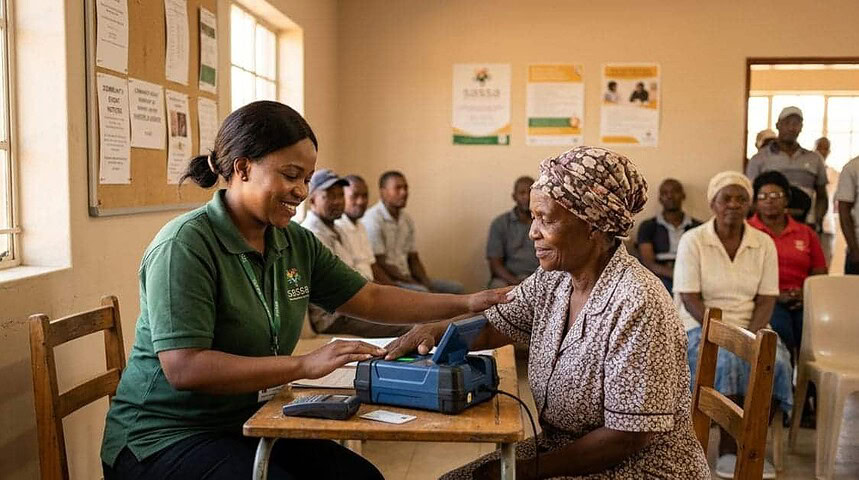
Important: SASSA biometric verification is now mandatory for all active grant beneficiaries. Failure to complete verification by the relevant deadline may result in suspended payments. Read this guide in full before visiting a SASSA office or attempting online verification.
What is SASSA Biometric Verification?
SASSA biometric verification is a mandatory identity-confirmation process introduced by the South African Social Security Agency to ensure that grant payments reach legitimate beneficiaries and not fraudsters or deceased individuals.
In simple terms, it means using your unique physical features — most commonly your fingerprints or a facial scan — to prove that you are who you claim to be. Unlike a password or PIN, biometric data cannot easily be stolen, shared, or guessed, making it a far more secure method of identity verification for the millions of South Africans who depend on their grants each month.
The process is managed in partnership with the Department of Home Affairs and applies to all SASSA grant recipients, from Old Age pensioners to SRD R370 applicants.
Why SASSA is Rolling Out Biometric Verification
SASSA has faced serious challenges with fraudulent claims, duplicate beneficiaries, and payments made to deceased people. Biometric verification is the agency's most significant step yet in closing these gaps.
"SASSA is strengthening grant verification processes through biometric verification and e-Life Certification to protect legitimate beneficiaries and safeguard public funds." — SASSA via GovernmentZA
Key reasons behind the rollout include:
- Eliminating ghost beneficiaries — people who continue to receive grants after death or disqualification.
- Preventing identity fraud — third parties fraudulently claiming grants using stolen ID documents.
- Ensuring fiscal integrity — protecting the billions distributed monthly through the social grants system.
- Compliance with the SASSA Act — the agency is legally obligated to verify beneficiary identities on an ongoing basis.
Which SASSA Grants Require Biometric Verification?
SASSA biometric verification for grant beneficiaries covers all active social grants. If you receive any of the following, you will be required to complete the process:
SASSA biometric verification for grants that are means-tested may also include a financial review at the same appointment. Bring your latest bank statements or proof of income if applicable.
How the SASSA Biometric Verification Process Works
The process differs slightly depending on whether you verify in person or online. Here is the in-person process for most grant types:
- Receive your notificationSASSA will notify you via SMS, post, or through your payment channel that your biometric verification is due. The message will include a deadline date and options for where to go.
- Gather your documentsBring your green barcoded ID book or smart ID card, your SASSA card or payment letter, and any supporting documents such as proof of address or a medical certificate.
- Visit your nearest SASSA office or mobile unitSASSA deploys mobile units to rural areas. Check sassa.gov.za or call 0800 60 10 11 for your nearest schedule.
- Submit your biometricsA SASSA official will capture your fingerprints using a biometric scanner and/or take a facial photograph compared against your Home Affairs records. The process takes approximately 5–10 minutes.
- Receive confirmationOnce your identity is successfully verified, you will receive a confirmation SMS or a stamped slip. Your grant payments will continue uninterrupted from the next payment cycle.
Tip: Arrive early — SASSA offices can have long queues during verification drives. SASSA offices are required to prioritise persons with disabilities, pregnant women, and those over 60.
How to Do Biometric Verification on Your Phone
For SRD R370 grant recipients and certain other beneficiaries, SASSA has introduced a digital biometric verification pathway that can be completed on a smartphone — the fastest and most convenient option.
Requirements for phone-based verification
- A smartphone with a functional front-facing camera
- A South African phone number registered to your ID
- Internet access (Wi-Fi or mobile data)
- Your South African ID number
Step-by-step: biometric verification via the SRD portal
- Visit the SRD portalGo to srd.sassa.gov.za on your phone's browser. Only use the official SASSA portal — not third-party apps.
- Enter your ID number and phone numberAn OTP will be sent to your registered mobile number. Enter it to log in securely.
- Select "Verify Identity"From your dashboard, tap the biometric or identity verification option. You will be prompted to allow camera access.
- Complete the facial scanPosition your face within the on-screen guide and follow the prompts. The system compares your live image against your Home Affairs record in real time.
- Wait for confirmationYou will receive an SMS confirming that your SASSA biometric verification was successful, usually within a few minutes to 24 hours.
If the facial scan fails, you will be directed to complete verification in person at a SASSA office. Three failed attempts may flag your account for manual review.
SASSA Biometric Verification for the SRD Grant
The SRD R370 grant has its own biometric verification pathway handled primarily online. SASSA introduced biometric verification for SRD grant beneficiaries to address a high rate of fraudulent applications. The system cross-references applicant data against:
- SARS income records
- UIF beneficiary databases
- The National Student Financial Aid Scheme (NSFAS)
- Other government grant systems
When inconsistencies are found, biometric verification for SRD grant recipients is triggered as an additional authentication step. This does not automatically mean your grant has been suspended — it simply means SASSA needs you to confirm your identity before payments continue.
SRD applicants: If your status says "Identity Verification Required", log in at srd.sassa.gov.za immediately and complete the facial scan. Ignoring the prompt may result in your application being declined for that month.
SASSA Biometric Verification 2026 — Dates & Schedule
SASSA rolls out biometric verification in phases by region and grant type. Below is a summary of key dates for SASSA biometric verification 2026:
| Phase / Grant Type | Target Period | Verification Method | Status |
|---|---|---|---|
| SRD R370 (online) | Ongoing — monthly | Online / phone (srd.sassa.gov.za) | Active |
| Old Age Grant | Jan – Jun 2026 | In person / mobile units | Active |
| Disability Grant | Feb – Aug 2026 | In person (medical review may apply) | Active |
| Child Support Grant | Mar – Sep 2026 | In person / mobile units | Active |
| All remaining grants | September – December 2026 | In person / online where available | Upcoming |
The September – December 2026 phase is expected to be the broadest sweep of the rollout, targeting all remaining unverified beneficiaries across every grant category. SASSA has confirmed an expanded mobile unit deployment to reach beneficiaries in remote areas who missed earlier verification windows.
Reminder: Check your specific deadline by calling 0800 60 10 11 (toll-free) or logging into your SASSA account. Dates vary by province and grant type.
SASSA Biometric Verification Complaints
Common issues reported by beneficiaries include fingerprints not being recognised, facial scan failures, long queues, grants suspended without notification, and technical portal errors. Here is how to lodge a formal SASSA biometric verification complaint:
- Call the SASSA toll-free helplineDial 0800 60 10 11 — free from any phone. Explain the issue and request a case reference number.
- Visit your nearest SASSA officeRequest to speak with a supervisor. Ask for an alternative biometric method (e.g. facial scan instead of fingerprints) if one method consistently fails.
- Submit via the SRD portalFor SRD-related issues, log in at srd.sassa.gov.za and use the query/complaint submission feature.
- Escalate to the SAHRCIf SASSA fails to resolve your complaint, escalate to the South African Human Rights Commission at sahrc.org.za or on 011 877 3600.
- Contact Black SashBlack Sash (blacksash.org.za) provides free advice and advocacy for grant beneficiaries facing illegal grant suspensions.
Document every interaction — keep SMS notifications, note dates and names of SASSA staff, and retain all written correspondence.
Need Emergency Funds While Your Grant is Delayed?
Grant payment suspensions during biometric verification can create serious cash flow problems. Compare short-term personal loans from South African lenders available to SASSA recipients.
Compare Loan Options →Frequently Asked Questions
What is SASSA biometric verification?
SASSA biometric verification is an identity-confirmation process in which grant beneficiaries prove who they are using unique physical characteristics — typically fingerprints or a facial scan. It is mandatory for all active SASSA grant recipients.
How do I do biometric verification on my phone?
Visit srd.sassa.gov.za on your smartphone, log in with your ID and phone number, then follow the facial verification prompts. You will need a working front camera and good lighting. This method is currently available primarily for SRD grant applicants.
Which SASSA grants require biometric verification?
All active SASSA grants require biometric verification, including the Old Age Pension, Disability Grant, Child Support Grant, Foster Child Grant, Care Dependency Grant, and the SRD R370 grant.
What happens if I don't complete biometric verification in time?
Your grant payments will be suspended until your identity is confirmed. If your grant is suspended without prior notification, contact the SASSA helpline immediately — this may constitute an administrative error.
My fingerprints are not being recognised. What can I do?
Ask the SASSA official to try the facial recognition alternative. If both methods fail, request a manual review appointment with a SASSA supervisor, who has the authority to approve alternative identity verification methods for exceptional cases.
When does SASSA biometric verification run for the rest of 2026?
The September – December 2026 phase is the broadest sweep of the rollout, targeting all remaining unverified beneficiaries across all grant categories. Specific dates by province will be communicated via SMS. Call 0800 60 10 11 to confirm the schedule for your area.
Can I do biometric verification on behalf of a disabled family member?
No — biometric data is personal and cannot be provided by a representative. SASSA makes provision for home visits for bedridden beneficiaries. Contact your nearest SASSA office or the helpline to arrange a home visit.
How do I check if my biometric verification was successful?
You should receive an SMS confirmation within 24 hours. SRD applicants can also log in at srd.sassa.gov.za to check their status. Keep any paper confirmation slip until you receive SMS confirmation and your next payment processes successfully.
Summary: Key Takeaways
SASSA biometric verification is a permanent feature of South Africa's grant administration. Whether you are a long-standing Old Age pensioner, a Child Support Grant recipient, or an SRD R370 applicant, the process is designed to be completed once and to protect your payments going forward.
The most important steps: act as soon as you are notified, use the phone-based option if you qualify for the SRD grant, bring the correct documents to any in-person appointment, and know your rights if the process does not go smoothly.
For all other grant and financial queries relevant to SASSA beneficiaries in South Africa, explore the resources at loan-lenders.co.za.